 boot13
Yesterday, in a blog post aimed at people who support Windows in organizations, Microsoft responded to some of the questions that arose in the wake of their announcement of upcoming changes to the way Windows 7 and 8.x are updated.
If you plan to risk a migraine and read Microsoft’s blog post, keep in mind that the intended audience is Enterprise users, not us lowly consumers (aka Windows 7/8 Home/Pro users). Parts of the post need to be interpreted differently for non-enterprise users. For instance, references to WSUS and ConfigMgr only apply to Enterprise users.
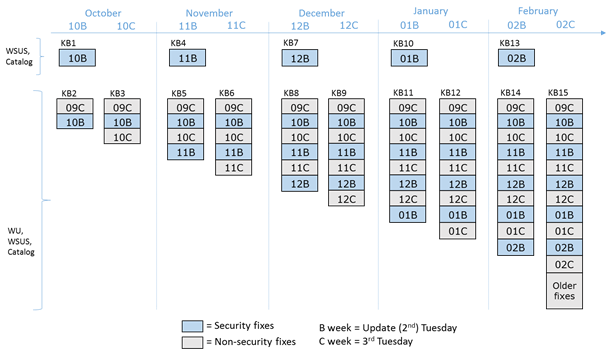
The changes will take effect on October 11, next week’s Patch Tuesday. The bottom line is that updates will no longer be delivered separately, but in large update packages. Each month, three of these packages will be produced:
- security-only quality update – a single update containing this month’s security updates; not available through Windows Update!
- security monthly quality rollup – a single update containing this month’s security updates, as well as non-security updates from the previous month, and the contents of all previous rollups.
- preview of the monthly quality rollup – perhaps weirdest of all, this update will contain next month’s non-security updates. In other words, this month’s non-security updates, which are otherwise not available in the regular monthly rollup. Microsoft seems to be saying “For those of you who want this month’s non-security updates but would prefer not to wait until next month to get them, here’s a preview of those updates.” Even weirder, this update will become available the week after the regular Patch Tuesday. The preview rollups will also include fixes from all previous monthly rollups, and older updates will be gradually added as well.
Questions
Why will the monthly rollups contain non-security updates from the previous month? For example, according to Microsoft, the first (October 2016) rollup will include non-security updates from September. But why delay October’s non-security fixes for another month? This makes no sense.
What happens if an update causes problems? In the past, you could just uninstall the problematic update. That won’t be an option with this new system. Microsoft’s response to this question makes it clear that this is your fault: “Every Windows update is extensively tested with our OEMs [customers] and ISVs [customers], and by customers – all before these updates are released to the general population. Your organization may also be interested in validating updates before they are publicly released, by participating in the Security Update Validation Program (SUVP).” In other words, our updates are thoroughly tested by you, and if you’re not testing them, you should be.
Why is Microsoft doing this?
According to Microsoft, these changes will “simplify your updating of Windows 7 SP1, Windows 8.1, … while also improving scanning and installation times and providing flexibility depending on how you typically manage Windows updates today.”
There may actually be some good reasons for bundling updates. But Microsoft is being so vague that it’s hard to believe they aren’t trying to foist something unwanted on us. Maybe the new system will make Windows Update faster and more reliable. Maybe it will simplify updates, an appealing notion for many users. Maybe it will make us all safer. It’s difficult to predict.
But there’s no question that these changes will make it difficult to avoid unwanted updates, and therein lies the problem. We already know for sure that Microsoft desperately wants us to either upgrade to Windows 10, or install updates that make Windows 7 and 8 more like Windows 10. Clearly these changes are beneficial to Microsoft, and we have a pretty good idea why (it’s advertising infrastructure). And, despite Microsoft’s assurances, we can be fairly certain that these changes don’t actually benefit the user, unless the user enjoys targeted advertising.
Given Microsoft’s recent actions, and suspicions concerning their actual motivation, these new updates are going to be examined closely. Are all the ‘security’ updates actually necessary? Are they even related to security? Microsoft can slap a ‘security’ label on anything they want and force it down our throats.
What can we do about this?
If you use Windows 7 or 8.x Home or Professional, there’s not much you can do. As I explained in an earlier post, you can trust that Microsoft will act in your best interest and let them install what they want on your computer (yikes), you can stop using Windows Update completely (also yikes), or you can switch to Linux.
It’s also still possible that – with enough pressure from users – Microsoft could make these changes more palatable. The Electronic Freedom Foundation says (and I totally agree) that “Microsoft should come clean with its user community. The company needs to acknowledge its missteps and offer real, meaningful opt-outs to the users who want them, preferably in a single unified screen. It also needs to be straightforward in separating security updates from operating system upgrades going forward, and not try to bypass user choice and privacy expectations.” I would add that Microsoft should describe in detail exactly what each update really does, and how it affects the collection and transmission of user activity and other information.
Related news
Woody Leonhard reports that Microsoft recently reactivated one of the Windows 7/8 updates associated with the ‘Get Windows 10’ nightmare. In response to the predictable uproar, Microsoft simply repeated their claims that this update is nothing to worry about, while saying nothing about what the update actually does.